
The best baby monitor for most families in 2026 is the eufy Baby Monitor C10 — it’s a no-subscription hybrid WiFi model with 2K video and a dedicated parent screen. But the right monitor for your family depends on one question we’ll answer before any product review: are you a data parent or a simple-video parent? Reading this guide will take five minutes. Buying the wrong monitor will cost you $150 to $300 and a lot of 3am frustration.
The Most Important Thing Nobody Tells You Before You Buy
Several of the most popular baby monitors in 2026 charge a monthly subscription fee for their best features. Nanit charges $5 to $10 per month for sleep insights and video history. Owlet gates some of its health-tracking analytics behind a plan. Over two years, that subscription adds $120 to $240 to the sticker price — turning a $289 monitor into a $430 to $530 purchase. That’s not a reason to avoid these monitors, but it is a reason to know your real 2-year cost before you fall in love with a feature list.
The other thing nobody says clearly enough: WiFi push notifications from baby monitors can be delayed by up to 30 minutes in independent testing. If you plan to rely solely on app notifications rather than a dedicated parent unit for overnight monitoring, that delay matters.
Are You a Data Parent or a Simple-Video Parent?
Data parent: You want to know when your baby fell asleep, how many times they stirred, what their sleep patterns look like over weeks. Numbers help you feel in control of an uncontrollable situation. You’ll actually open the sleep analytics in the app. The Nanit Pro and Owlet Dream Sight are built for you.
Simple-video parent: You want to see your baby clearly and hear them when they cry. You don’t want app dashboards, subscription tiers, or a notification that tells you your baby’s “sleep efficiency” was 74% last night. The eufy models, Infant Optics DXR-8 PRO, and Momcozy are built for you.
Neither camp is wrong. Knowing which one you are will save you from buying a $300 smart monitor that you end up using as a basic camera — or a simple monitor that leaves an anxious first-time parent wanting more reassurance than the hardware provides.
Quick Picks: Find Your Monitor in 30 Seconds
- Best Overall (No Subscription): eufy Baby Monitor C10
- Best Hybrid WiFi + Dedicated Screen: eufy Baby Monitor E20
- Best for Data-Driven Parents (Sleep Analytics): Nanit Pro Smart Baby Monitor
- Best Premium System with 8″ Display: Nanit Smart Baby Monitor System + 8″ Display
- Best No-WiFi Hack-Proof Monitor: Infant Optics DXR-8 PRO
- Best Gateway to Health Monitoring: Owlet Dream Sight Gen 3
- Best Value Dedicated Screen: Momcozy 1080P 5″ Video Monitor
Full Comparison Table
| Monitor | Type | Resolution | Subscription? | Parent Unit? | Best For |
|---|---|---|---|---|---|
| eufy C10 | Hybrid WiFi/No-WiFi | 2K HD | No | Yes — 4.5″ display | Best overall no-subscription |
| eufy E20 | Hybrid WiFi/No-WiFi | 2K HD | No | Yes — 5″ display + portable camera | Best hybrid with larger screen |
| Nanit Pro | WiFi (app-based) | 1080p HD | Yes — $5-10/mo for insights | Optional — sold separately | Best sleep analytics |
| Nanit + 8″ Display | WiFi + dedicated display | 1080p HD | Yes — $5-10/mo | Yes — 8″ display included | Best premium complete system |
| Infant Optics DXR-8 PRO | No-WiFi (FHSS) | 1080p HD | No | Yes — 5″ HD display | Best hack-proof, no WiFi needed |
| Owlet Dream Sight Gen 3 | WiFi (app-based) | 2K HD | No for base; Sock sold separately | No — app only | Best entry to health monitoring |
| Momcozy 1080P 5″ | WiFi/No-WiFi | 1080p HD | No | Yes — 5″ display | Best value dedicated screen |
1. eufy Baby Monitor C10 — Best Overall for Most Families
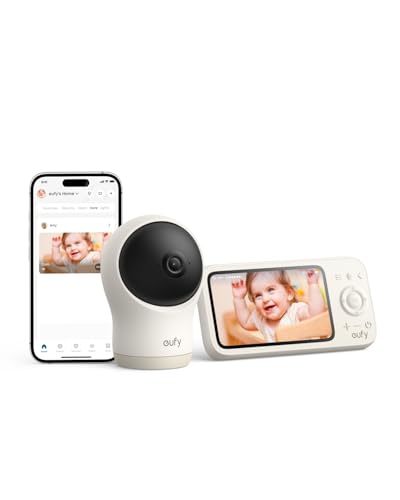
Verdict: The safest first choice for most parents — clear 2K video, no subscription, works with or without WiFi, dedicated parent screen included.
The eufy C10 solves the two biggest baby monitor frustrations in one package: subscription fees and WiFi dependency. You get a 2K HD camera, a 4.5″ dedicated parent display, and the ability to flip between WiFi app monitoring and local-only monitoring with a physical switch on the camera. No monthly bill. No “your free trial has ended” popup at three months in. No relying on your home router to stay connected at 2am.

Key features that matter in daily use:
- 2K HD camera: Clear enough to see chest movement and facial details in the dark without straining. Night vision is automatic and doesn’t emit visible light that could disturb sleep.
- Hybrid WiFi/No-WiFi: Use the dedicated parent screen at home, switch to the eufy Baby app when you’re in another part of the house or away. One physical switch controls it — no settings menus mid-night.
- Pan, tilt, 4x zoom: Adjust the camera view remotely from the parent unit without entering the nursery. As your baby becomes mobile, you can follow them across the crib without repositioning the camera.
- Motion, noise, and temperature alerts: Customizable sensitivity means you’re not getting a notification every time a car goes past the window. Five sensitivity levels for cry and noise detection.
- Two-way talk: Soothe your baby with your voice from another room without opening the door and triggering full wakeup.

Pros:
- No subscription — ever. Full features included in the purchase price
- Works without WiFi — keeps monitoring if your router goes down overnight
- Dedicated parent unit means no draining your phone battery while monitoring
- 2K resolution is sharper than most monitors in this price range
- Physical WiFi switch for easy privacy control
Cons:
- 4.5″ display is smaller than the 5″ screens on competitor models and the eufy E20
- 12-hour parent unit battery — needs nightly charging, though most parents charge it on the nightstand anyway
- No sleep analytics or breathing tracking — for that, step up to the Nanit or Owlet
Best for: First-time parents who want reliable 2K video, no ongoing costs, and the security of a dedicated screen that doesn’t depend on WiFi. Families in apartments with congested networks. Parents who value simplicity over data.
Not for: Parents who want sleep analytics, breathing monitoring, or overhead camera positioning for true sleep tracking.
How it compares: vs. Infant Optics DXR-8 PRO — the C10 adds WiFi flexibility and 2K resolution; the DXR-8 PRO adds interchangeable lenses and a longer track record of durability. vs. Nanit Pro — the C10 is simpler and subscription-free; Nanit adds sleep analytics at extra monthly cost.
Check Current Price on Amazon →
2. eufy Baby Monitor E20 — Best Hybrid Monitor with Larger Screen
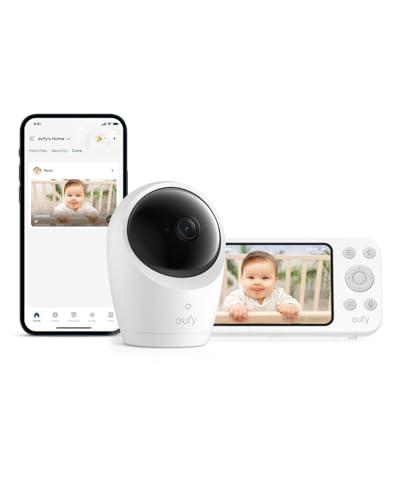
Verdict: The better eufy choice if you want a larger parent screen, a portable camera with its own battery, and Active Noise Reduction — for a moderate price step up from the C10.
The E20 is the step-up from the C10 in three meaningful ways: a larger 5″ 720p parent display, a portable camera with a 5,000mAh built-in battery (about 9 hours of use without being plugged in), and Active Noise Reduction for cleaner audio in the parent unit. That combination makes the E20 notably better for parents who move the camera around — traveling, grandparents’ visits, daytime nap location changes — rather than keeping it in a fixed nursery position.

Key features that matter in daily use:
- Portable 5,000mAh camera battery: About 9 hours untethered — move the camera to a travel crib, a grandparent’s house, or a daytime nap location without finding an outlet every time.
- Active Noise Reduction (ANR): Reduces background hiss and ambient noise in the audio feed, which matters most in nurseries near HVAC systems, fans, or white noise machines.
- 5″ parent display: The larger screen makes a real difference for late-night glances from across a dark room.
- 24/7 in-app recording: Video history accessible in the eufy Baby app when connected to WiFi — no subscription required for this feature.
- Hybrid monitoring: Same WiFi/No-WiFi switch as the C10 — full local operation without the internet if needed.

Pros:
- Portable camera is a genuine differentiator from fixed-mount competitors
- No subscription — same as C10, full features included
- Larger 5″ display is easier to read in a dark room
- ANR improves audio quality meaningfully over basic monitors
- Hybrid operation keeps monitoring reliable regardless of WiFi status
Cons:
- Parent display resolution is 720p — lower than the 1080p on the Infant Optics DXR-8 PRO’s 5″ screen
- Camera battery life drops to about 5.5 hours with night vision active — plan for overnight charging
- No sleep analytics, no health tracking
Best for: Families who move the camera frequently — travel, daytime flexibility, multi-room monitoring. Parents who want the largest no-subscription eufy option. Anyone who has been annoyed by noisy audio feeds from a previous monitor.
Not for: Families who need the camera fixed in one position and won’t use the portable battery feature — the C10 saves money in that case.
How it compares: vs. eufy C10 — bigger screen, portable camera battery, better audio. Worth the upgrade if you’ll move the camera. vs. Momcozy — E20 has better audio and a portable camera; Momcozy has a 1080p display at a competitive price.
Check Current Price on Amazon →
3. Nanit Pro Smart Baby Monitor — Best for Data-Driven Parents
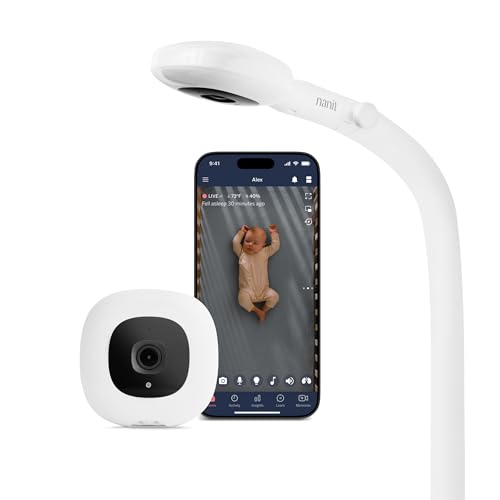
Verdict: The best sleep analytics system in 2026 — but read the real 2-year cost before you buy, and only choose it if you’ll actually use the data.
The Nanit Pro is the most consistently recommended smart baby monitor in independent tests in 2026, and for genuinely data-focused parents, it earns that position. The overhead camera angle tracks breathing motion through a special Breathing Band swaddle (included), and the sleep analytics in the app go well beyond “baby is awake/asleep” — tracking sleep and wake cycles, time to fall asleep, total sleep duration, and offering personalized tips based on your baby’s specific patterns. For a first-time parent trying to establish a sleep routine, that data can be genuinely useful rather than anxiety-inducing.
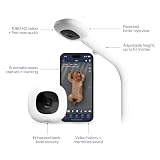
Key features that matter in daily use:
- Overhead camera positioning: Mounts above the crib looking straight down — gives a true bird’s-eye view of the entire crib surface, which is the best angle for detecting position and movement.
- Breathing motion tracking: Uses the included Breathing Band swaddle to track breathing through computer vision. If no breathing is detected, a red alert sounds on both your phone and the camera itself.
- Sleep analytics: Daily sleep summaries, weekly trend tracking, and personalized sleep tips. First year of Insights subscription typically included; paid plan required after.
- Scales to multiple cameras: One Nanit account supports up to six cameras — useful when you add a second child or want to monitor multiple rooms.
- Optional 8″ Home Display: Sold separately (or as part of the system bundle below) for parents who want a dedicated screen rather than app-only monitoring.

Pros:
- Best sleep analytics of any monitor on this list
- Overhead camera angle is ideal for crib monitoring
- Breathing motion tracking adds genuine reassurance for anxious parents
- Scales cleanly to a second baby or second room
- Strong app stability and reliability in independent testing
Cons:
- Subscription required for sleep insights after the first year — $5-10/month, adding $120-240 over two years
- No dedicated parent unit included — app-only by default (buy the bundle below if you want a screen)
- Breathing tracking requires the specific Nanit Breathing Band swaddle — a proprietary add-on
- WiFi-only — no local fallback if your internet goes down
Real 2-year cost: ~$289 monitor + up to $240 subscription = up to $530 total. Know this before you buy.
Best for: First-time parents who find data reassuring rather than anxiety-inducing. Parents trying to establish a sleep schedule who’ll genuinely use the analytics. Families planning a second child who want a system that scales.
Not for: Parents who won’t open a sleep analytics dashboard at 7am. Anyone who wants a dedicated parent screen included. Families without reliable home WiFi.
How it compares: vs. eufy C10 — Nanit adds sleep analytics and breathing tracking; eufy adds no subscription and WiFi independence. vs. Owlet Dream Sight — Nanit is better for sleep data; Owlet is better as a gateway to physiological health tracking (pulse rate, SpO2 via separate Sock).
Check Current Price on Amazon →
4. Nanit Smart Baby Monitor System with 8″ Display — Best Premium Complete System
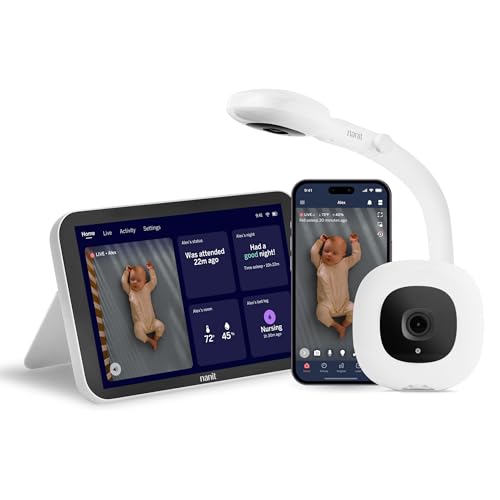
Verdict: The best setup for parents who want Nanit’s sleep analytics AND a dedicated home display — but make sure the total cost (monitor + subscription + any stand accessories) fits your budget.
If the Nanit Pro is the camera, this bundle is the Nanit Pro plus the 8″ Home Display that answers the most common complaint about the standard Nanit: no parent unit included. The 8″ display is genuinely large enough to see comfortably from across a dark bedroom, streams the live camera feed directly, and provides the reassurance of a dedicated device that isn’t sharing battery with your phone’s notifications, texts, and apps.

Key features that matter in daily use:
- 8″ Home Display: The largest dedicated screen of any monitor on this list. Sits on a nightstand and streams live video without needing your phone.
- All Nanit Pro features: Overhead camera, breathing motion tracking, sleep analytics, two-way audio — everything in the camera section above, plus the display.
- Floor stand option: The bundle includes floor stand mounting — no wall drilling, no finding a flat surface at crib height.
- App access simultaneously: The display and the app work at the same time — a partner can check from their phone while the display is active on the nightstand.
Pros:
- Solves the Nanit Pro’s only major complaint — no dedicated screen — with an 8″ display
- Largest parent display of any monitor on this list
- Floor stand eliminates wall-mounting requirement
- Everything included — camera, display, breathing band, stand
Cons:
- Highest price of any pick on this list — check current price carefully
- Subscription still required for sleep insights after the first year
- WiFi-only — same limitation as the standard Nanit Pro
- 8″ display is large — requires a dedicated nightstand spot
Best for: Parents who want the full Nanit experience without compromise — sleep analytics, breathing tracking, and a proper home display, all in one purchase. Families who’ve budgeted for the best available smart monitor system.
Not for: Parents who want any monitor under $300. Anyone without reliable WiFi. Budget-conscious buyers who won’t use the analytics.
Check Current Price on Amazon →
5. Infant Optics DXR-8 PRO — Best No-WiFi Hack-Proof Monitor

Verdict: The most reliable non-WiFi monitor available — no subscription, no hacking risk, no internet dependency. The right choice if you want simplicity and security above everything else.
Non-WiFi monitors transmit using FHSS (Frequency-Hopping Spread Spectrum) — the signal hops across radio channels dozens of times per second, which makes it inherently secure without requiring encryption, passwords, or firmware updates. There is no camera feed being sent through the internet, which means there is nothing to intercept remotely. The 2015-era “someone hacked my baby monitor” horror stories came from cheap WiFi IP cameras with no encryption — that’s not what the DXR-8 PRO is.
Key features that matter in daily use:
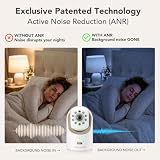
- Patented Active Noise Reduction (ANR): Reduces background hiss and fan noise in the audio feed — one of the better audio experiences in the non-WiFi category, particularly in nurseries with white noise machines running.
- 5″ HD parent display: Larger and sharper than the eufy C10’s 4.5″ display.
- Interchangeable optical lenses: The DXR-8 PRO supports optional wide-angle and zoom lenses — useful for different crib sizes and room configurations.
- 11.5-hour parent unit battery: The longest battery life of any monitor with a dedicated parent unit on this list.
- No WiFi required — ever: Works through walls, floors, during power outages, in rural areas with poor internet, in hotels. Range is typically up to 4 walls in standard testing.

Pros:
- Zero subscription fees — ever
- No WiFi means no hacking risk, no router dependency
- Best battery life of any dedicated-screen monitor here (11.5 hours)
- 5″ HD display is one of the better parent screens available
- Interchangeable lenses add flexibility no other monitor here offers
- Strong long-term reliability track record — this model has been in homes for years
Cons:
- No remote viewing when away from home — if you want to check in from work, this isn’t your monitor
- No sleep analytics, no health tracking
- Range limited by walls — 4-wall coverage in testing, which is fine for most homes but may fall short in very large properties
- No two-way audio on the camera without WiFi
Best for: Parents who prioritize security and privacy above smart features. Families in areas with unreliable WiFi. Anyone who’s had a bad experience with a WiFi monitor dropping connection overnight. Parents who want to use the same monitor for years without changing anything.
Not for: Parents who need to check the monitor remotely from work or travel. Anyone who wants sleep analytics or health data.
How it compares: vs. eufy C10 — DXR-8 PRO is fully WiFi-free with better battery and interchangeable lenses; eufy C10 adds WiFi flexibility and slightly sharper camera resolution. vs. Momcozy — DXR-8 PRO is more secure and has better battery; Momcozy adds WiFi app access.
Check Current Price on Amazon →
6. Owlet Dream Sight Gen 3 — Best Gateway to Health Monitoring
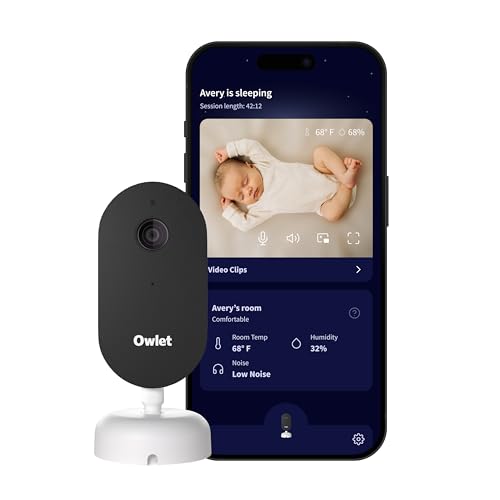
Verdict: A strong 2K camera that works well as a standalone monitor — but its main value is as the camera half of the Owlet health monitoring system. Read what’s included before you buy.
Here’s what the Owlet Dream Sight does: it’s a 2K WiFi camera with clear video, reliable app connectivity, and FDA-cleared security certification. Here’s what it doesn’t do that many buyers assume it does: it does not track pulse rate, blood oxygen (SpO2), or any physiological health metrics. Those features require the separately purchased Owlet Dream Sock. The Dream Sight is the camera half of the Dream Duo system — fully functional on its own, but not a health monitor without the Sock.

Key features that matter in daily use:
- 2K HD camera: Sharp, clear video that holds detail in low-light conditions without visible light disturbing sleep.
- FDA-cleared security certification: One of the more rigorously security-audited monitors on the market — a meaningful credential for parents concerned about WiFi monitor privacy.
- Background audio: App streams audio even when you switch to another phone app — you’ll hear your baby cry without having the Owlet app open.
- Expandable to Dream Sock: Add the Owlet Dream Sock later for FDA-cleared pulse rate and SpO2 monitoring. The camera and Sock integrate into one app.
- No subscription for core monitoring: The basic camera and alert features don’t require a monthly fee. Some advanced analytics may require an Owlet plan — confirm current terms before purchasing.

Pros:
- 2K video is excellent quality for a monitor in this price range
- FDA-cleared security certification is a genuine trust signal
- Background audio works while using other phone apps — practical for a parent who’s also texting or navigating during monitoring
- Scales to full health monitoring by adding the Dream Sock later
- No dedicated parent unit needed — if you’re comfortable with app-only monitoring, this is a clean, minimal setup
Cons:
- App-only — no dedicated parent screen. This is a real limitation for overnight monitoring without draining your phone
- Health tracking requires the Dream Sock purchased separately — not included, and costs significantly more on top of this camera
- WiFi-only — no local fallback
- Push notifications subject to the same delay risk as other app-only WiFi monitors
Best for: Parents who want a high-quality 2K camera now and plan to add Owlet health monitoring later. Tech-comfortable parents who are fine with app-only monitoring. Parents who specifically want the Owlet ecosystem.
Not for: Parents expecting health metrics to be included — they are not. Anyone who wants a dedicated parent screen. Families without reliable home WiFi.
How it compares: vs. Nanit Pro — Dream Sight is better as a gateway to physiological monitoring (pulse/SpO2 via Sock); Nanit is better for sleep analytics. vs. eufy C10 — eufy has no subscription and works without WiFi; Owlet has better FDA security credentials and expandable health tracking.
Check Current Price on Amazon →
7. Momcozy 1080P 5″ Video Baby Monitor — Best Value with Dedicated Screen

Verdict: The best value monitor with a dedicated 5″ 1080p screen — solid video quality, no subscription, and a clear picture at a lower price than premium brands.
The Momcozy earned its place in multiple 2026 roundups as a value pick, and it holds up: a 5″ 1080p dedicated screen is better image quality than the eufy C10’s 4.5″ display, and the price sits below both eufy models and well below the Nanit. If your priority is a clear dedicated parent screen without WiFi complexity and without monthly fees, this is the most cost-effective way to get it.

Key features that matter in daily use:
- 5″ 1080p dedicated parent display: The sharpest dedicated-screen display in the value tier. 1080p resolution at 5 inches is genuinely clear for late-night glances.
- Motion and cry detection: Alert system notifies you on the parent unit when motion or sound is detected in the nursery.
- Night vision: Automatic infrared night vision for clear monitoring in complete darkness.
- No subscription: All features available from purchase with no monthly fee.
- Two-way audio: Soothe your baby via the parent unit speaker.
Pros:
- Best value per dollar of any monitor with a dedicated 5″ 1080p screen
- No subscription fees
- Simple setup — minimal app complexity
- Clear night vision quality for the price point
Cons:
- Less established brand track record than Infant Optics, eufy, or Nanit — fewer long-term durability reports
- Feature set is more basic — no sleep analytics, no hybrid WiFi switching, no interchangeable lenses
- Customer support and firmware update reliability are harder to assess without a long market history
Best for: Budget-conscious parents who want the best possible dedicated screen without premium-brand pricing. Families keeping it simple — see the baby, hear the baby, nothing more complicated.
Not for: Parents who want smart features, analytics, or health tracking. Anyone prioritizing long-term brand reliability over upfront value.
How it compares: vs. eufy C10 — Momcozy has a larger, sharper parent display for potentially less money; eufy C10 has hybrid WiFi flexibility and a more established brand. vs. Infant Optics DXR-8 PRO — DXR-8 PRO has better battery life, interchangeable lenses, and a longer reliability track record; Momcozy is typically cheaper.
Check Current Price on Amazon →
Is a WiFi Baby Monitor Safe?
The short answer: yes, if you buy from a reputable brand and follow basic setup steps. The “someone hacked my baby monitor” incidents that circulated in 2015 to 2020 involved cheap, off-brand IP cameras with no encryption — not current products from eufy, Nanit, Owlet, or Infant Optics. No major baby monitor brand has had a confirmed security breach in 2026.
To keep any WiFi monitor secure: use a strong, unique password for your home WiFi network (not your router’s default password), accept all firmware updates for the monitor when they’re available, enable two-factor authentication on the monitor’s app account if the option exists, and set up a separate IoT network on your router for baby devices if your router supports it.
For parents who are still not comfortable with WiFi monitoring regardless of the above, the Infant Optics DXR-8 PRO is the right choice — its FHSS local signal has no internet connection to intercept.
Who Should Skip Smart Monitors Entirely
- Parents without reliable home WiFi. A WiFi monitor that drops connection at 2am is worse than a simple non-WiFi monitor that never fails. Measure your actual WiFi coverage in the nursery before committing to an app-only monitor.
- Parents who find data more anxiety-inducing than reassuring. Sleep analytics and breathing alerts can be genuinely helpful — or they can become the source of a new category of 3am worry. Know yourself before choosing a data-rich monitor.
- Families who expect health tracking to be included in a camera purchase. The Owlet Dream Sight does not include the health-tracking Sock. The Nanit Pro does not include physiological monitoring. Read what’s actually in the box.
Frequently Asked Questions
What is the best baby monitor without a subscription fee?
The eufy C10, eufy E20, Infant Optics DXR-8 PRO, and Momcozy are all subscription-free — full features included in the purchase price. The Nanit Pro and Nanit + Display system require a subscription ($5-10/month) for sleep insights and video history after the first year.
Is a WiFi baby monitor safe from hacking?
Yes, from reputable brands in 2026. All major brands use AES-256 encryption. No major baby monitor brand has had a confirmed breach. Use a strong home WiFi password, keep firmware updated, and enable two-factor authentication on your account. For zero WiFi exposure, the Infant Optics DXR-8 PRO uses local FHSS transmission with no internet connection.
How much does the Nanit subscription cost?
The Nanit Insights subscription runs approximately $5 to $10 per month, depending on the plan tier, after the first year which is typically included with purchase. Over a second year, that adds $60 to $120 to the cost of ownership.
Does the Owlet Dream Sight include health monitoring?
No. The Owlet Dream Sight is a video camera only. Pulse rate and SpO2 (blood oxygen) monitoring require the Owlet Dream Sock, which is sold separately. The Dream Sight and Dream Sock together make up the Owlet Dream Duo system.
Final Recommendation
For most first-time parents: start with the eufy C10 or eufy E20 — no subscription, clear 2K video, works without WiFi, dedicated screen included. If you know you’re a data parent who will genuinely use sleep analytics, budget for the Nanit system with the 8″ display and factor in the subscription cost over two years. If security is your primary concern and you’d rather not have any WiFi camera in the nursery, the Infant Optics DXR-8 PRO is the most reliable choice in that category.
Quick Recap: Where to Buy
| Monitor | Best For | Subscription? | Check Price |
|---|---|---|---|
| eufy Baby Monitor C10 | Best Overall No-Subscription | No | View on Amazon |
| eufy Baby Monitor E20 | Best Hybrid + Larger Screen | No | View on Amazon |
| Nanit Pro | Best Sleep Analytics | Yes — $5-10/mo | View on Amazon |
| Nanit + 8″ Display System | Best Premium Complete System | Yes — $5-10/mo | View on Amazon |
| Infant Optics DXR-8 PRO | Best No-WiFi Hack-Proof | No | View on Amazon |
| Owlet Dream Sight Gen 3 | Best Gateway to Health Monitoring | No (Sock sold separately) | View on Amazon |
| Momcozy 1080P 5″ Monitor | Best Value Dedicated Screen | No | View on Amazon |